How to Organize Receipts for Your Small Business for Free
We have all heard it as a small business owner - “keep your receipts!!” But we are living in the digital age - you don’t want to keep a shoe box in your office for physical receipts or more than likely your receipts are all in your email… so what does this actually look like?!
Do I need to keep receipts for my small business?
Short answer, yes! This is a way to protect yourself if you were to get audited.
You may hear people say to keep receipts for things only over $75, but what I tell all of my clients is get it for anything you can! It just takes a little bit of time, and this is going to make your bookkeeping audit proof (fingers crossed this never actually happens).
You want to keep any receipts you receive that will help prove that yes, that was a business purchase - trips to target for office supplies, meals with clients, travel expenses, the new laptop you saved so hard for, the workshop about how to use instagram reels - you bought it, you keep the receipt.
Non-negotiables for me to get receipts for:
client meetings
travel expenses (meals, lodging, flights, etc)
anything that isn’t obvious (amazon, target, etc)
anything paid cash
large purchases
How can I keep track of receipts without a software?
There are a bunch of different softwares out there that you can use to keep your receipts organized - such as using QuickBooks Online (this is how I have my clients do it because I can match it directly to the expense).
Maybe you are just starting out and using a Google Sheet to track your expenses (like this one), and you are looking for a way to stay organized without adding another software to your tech stack. I’m going to walk you through how to keep your receipts without paying for another software.
For many of us, as business owners, we have a Google Drive. That is the tool we are going to use! Yes - just our handy, dandy Google Drive to scan, upload, and organize your receipts!
Here are 5 easy steps to scan, organize, and keep track of your receipts for taxes:
Create a folder in your Google Drive called “business receipts” with a subfolder for the year and then each month.
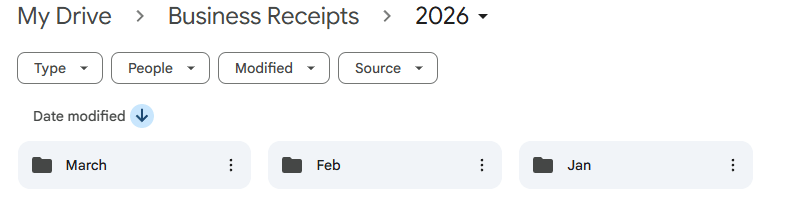
2. Uploading Physical receipts - download the Google Drive app on your phone
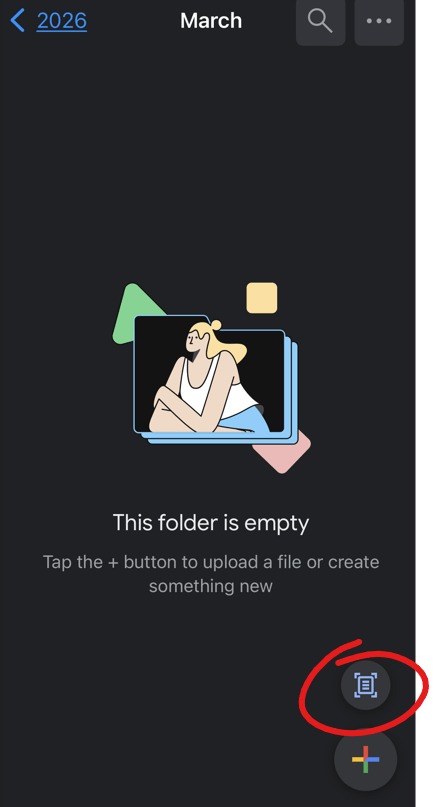
Whenever you get a physical receipt, you are going to open the Google Drive app on your phone, select the receipt folder for the month
Select the “scan document” option in the bottom right corner
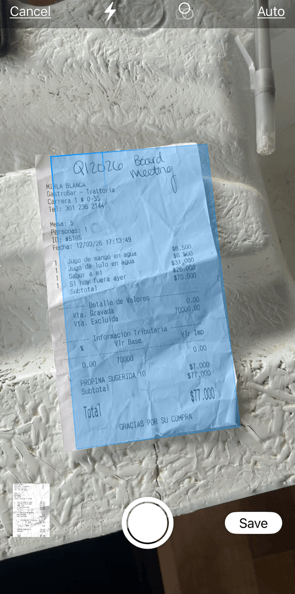
Scan your receipt, select save
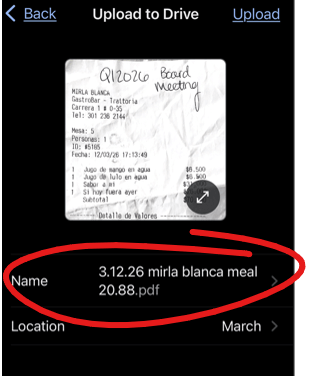
Rename the receipt to “date, who you paid, amount”
Select upload
3. Uploading receipts from your email to your Google Drive - there are a few ways you can do this!
If you love Zapier - you can easily create a zap to send these straight into your Google folder (Google “using Zapier to forward receipts into Google Drive folder” to find out how to set this up)
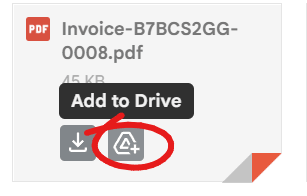
2. Typically your receipts in your email will come with an attached PDF. You are going to hover over the attached PDF, and select “add to drive” and then organize it in your receipts folder
Make sure to rename it to “date, who you paid, amount”
Example “3.12.26 Target 14.15”
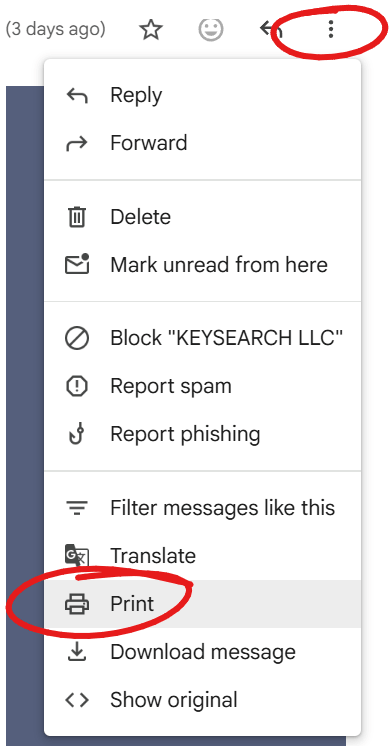
3. If you don’t have an attached PDF, you can select the three dots in the top right of the message, select “print” and save the email as a PDF before uploading to the google drive
make sure to save it as “date, who you paid, amount”
Example “1.3.26 Office Depot 52.79”
4. Now you have organized receipts that are searchable!
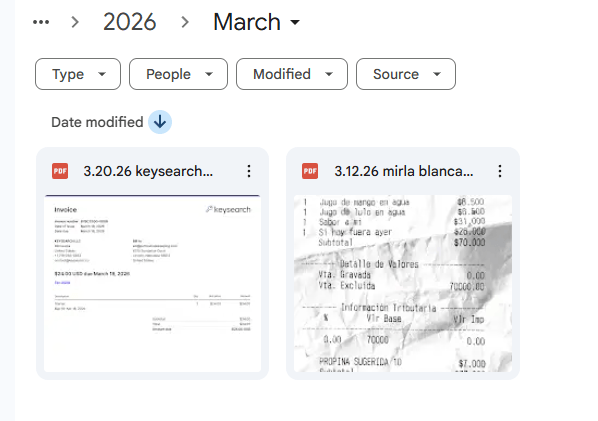
5. Repeat this year after year by creating a new folder for each year!
Create this one receipt tracking habit to have audit-proof bookkeeping
Upload receipts immediately:
Any time you get in your car from a business outing, scan the physical receipt before you leave the parking lot (we all know how easy it is to lose them).
When the receipt hits your inbox, add it to your Google Drive.
BONUS TIP: If you have a physical receipt, write at the top what it was for. If you went out to eat with a client write “client meal with _____” or “team meeting” or “travel meal while in _____” like this:

Receipt tracking is just one part of the bookkeeping process as a small business owner.
You also need to be categorizing your income + expenses so you are ready for tax season. If you are looking for and easy to use google sheet - check out my Income + Expense tracker (bonus: I show you how to link the receipts in your Google Drive to the expenses in the tracker).
Or maybe you are done with trying to figure out the whole bookkeeping thing - that is what I am here for! Fill out my new client form, and we can start chatting about what it would look like for you to hand your bookkeeping offcompletely.